Subnetting is split one big network into multiple little ones. You can do this based on network requirements (we need 130 networks) or you can do this on host requirementes (we need have 50 hosts per network).
Converting Decimal to Binary
IPv4 means we only have 4 bytes which means 4 numbers which can’t go higher than 255. Because the highest binary value is 11111111 and that equals 255.
Number 210 in binary
| 128 | 64 | 32 | 16 | 8 | 4 | 2 | 1 |
| 1 | 1 | 0 | 1 | 0 | 0 | 1 | 0 |
Number 20 in binary
| 128 | 64 | 32 | 16 | 8 | 4 | 2 | 1 |
| 0 | 0 | 0 | 1 | 0 | 1 | 0 | 0 |
Subnetting a Class A, B or C network
Now that we know how to convert a decimal number into binary we can begin to subnet an existing network.
There are 3 steps to subnet a Class A, B or C network:
- 1) Determine subnets + Convert to binary
- 2) Reserve bits in mask + find your increment
- 3) Re use increment to find network ranges
Example 1
Our example here is that we have an existing network 172.16.0.0 /16 and we are tasked to split this existing network in 100 subnetworks.
- So we convert this number 100 into binary, better we ask ourselves which is the bit that it takes to make the number 100 out of binary, in this case the number 64 (because 128 is already to high), so we mark this bit and count the bits from the right to the left until our marker.
So we have 7 bits here.
For me is much easier to write down the old subnet mask in binary as well, so i write it out. - Now we have to choose, do we want to have more networks (fill in the ones from the left), or are we saving the hosts (fill in from the right).
In this case, we want to have more networks, so we take our old subnet mask and fill in 7 bits from the left (because we have 7 bits to make 100.
The lowest 1 in the new subnet mask is always the increment, so in our case our increment is 2 in the third octet.
We define our new subnet mask in decimal as well and go to step 3. - Now we define our new ranges of the subnets. Our increment of 2 in the third octet defines the network ranges. So we add our increment in the third octet and end up with new subnet 1 of 172.16.0.0 and subnet 2 of 172.16.2.0 and so on.
So list of the total of subnets we got with our subnetting, we take the bits we defines in step 1 and take that times 2. So in our case 27 .
to get the total of hosts we take the 0s of the new subnet mask and put that times 2 and minus 2 (because the first and the last ip is not usable, so in our case 29 – 2.
Example 2
Our example here is that we have an existing network 10.0.0.0 /8 and we are tasked to split this existing network in 1000 subnetworks.
- So we convert this number 1000 into binary, better we ask ourselves which is the bit that it takes to make the number 1000 out of binary, in this case the number 512 (because 1024 is already to high), so we mark this bit and count the bits from the right to the left until our marker.
So we have 10 bits here. - Now we have to choose, do we want to have more networks (fill in the ones from the left), or are we saving the hosts (fill in from the right).
In this case, we want to have more networks, so we take our old subnet mask and fill in 10 bits from the left (because we have 10 bits to make 1000.
The lowest 1 in the new subnet mask is always the increment, so in our case our increment is 64 in the third octet.
We define our new subnet mask in decimal as well and go to step 3. - Now we define our new ranges of the subnets. Our increment of 64 in the third octet defines the network ranges. So we add our increment in the third octet and end up with a new subnet 1 of 10.0.0.0 and subnet 2 of 10.0.64.0 and so on.
So list of the total of subnets we got with our subnetting, we take the bits we defines in step 1 and take that times 2. So in our case 210 .
to get the total of hosts we take the 0s of the new subnet mask and put that times 2 and minus 2 (because the first and the last ip is not usable, so in our case 214 – 2.
Subnetting Based on Host Requirements
To do subnetting based on host requirements, we have the same 3 steps.
- 1) Determine hosts + Convert to binary
- 2) Reserve bits in mask + find your increment
- 3) Re use increment to find network ranges
Example 1
Our example here is that we have an existing network 200.1.1.0 /24 and we are tasked to split this existing network in 20 hosts per network.
- So we convert this number 20 into binary, better we ask ourselves which is the bit that it takes to make the number 20 out of binary, in this case the number 16 (because 32 is already to high), so we mark this bit and count the bits from the right to the left until our marker.
So we have 5 bits here. - Now we have to choose, do we want to have more networks (fill in the ones from the left), or are we saving the hosts (fill in from the right).
In this case, we want to SAVE THE HOSTS, so we take our old subnet mask and fill in 5 bits from the right (because we have 5 bits to make 20.
The lowest 1 in the new subnet mask is always the increment, so in our case our increment is 32 in the fourth octet.
We define our new subnet mask in decimal as well and go to step 3. - Now we define our new ranges of the subnets. Our increment of 32 in the fourth octet defines the network ranges. So we add our increment in the fourth octet and end up with a new subnet 1 of 200.1.1.0 and subnet 2 of 200.1.1.32 and so on.
So list of the total of subnets we got with our subnetting, we take the 1s right next to our filled in 0s until the octet is finished. So in our case 23 .
to get the total of hosts we take the defines bits, put that times 2 and minus 2 (because the first and the last ip is not usable, so in our case 25 – 2.
Example 2
Our example here is that we have an existing network 172.50.0.0 /16 and we are tasked to split this existing network in 1000 hosts per network.
- So we convert this number 1000 into binary, better we ask ourselves which is the bit that it takes to make the number 1000 out of binary, in this case the number 512 (because 1024 is already to high), so we mark this bit and count the bits from the right to the left until our marker.
So we have 10 bits here. - Now we have to choose, do we want to have more networks (fill in the ones from the left), or are we saving the hosts (fill in from the right).
In this case, we want to SAVE THE HOSTS, so we take our old subnet mask and fill in 10 bits from the right (because we have 10 bits to make 1000.
The lowest 1 in the new subnet mask is always the increment, so in our case our increment is 4 in the third octet.
We define our new subnet mask in decimal as well and go to step 3. - Now we define our new ranges of the subnets. Our increment of 4 in the third octet defines the network ranges. So we add our increment in the third octet and end up with a new subnet 1 of 172.50.0.0 and subnet 2 of 172.50.4.0 and so on.
So list of the total of subnets we got with our subnetting, we take the 1s right next to our filled in 0s until the octet is finished. So in our case 26 .
to get the total of hosts we take the defines bits, put that times 2 and minus 2 (because the first and the last ip is not usable, so in our case 210 – 2.
Subnetting Practice
Reverse Engineering a Mask
It is not that common that you create a network or a network for 200 hosts. The more common scenario is that the network is already in place and you see “ah ok we got this network /30 here and here’s the other one”.
Example
IP-Address: 192.168.5.22
Subnetmask: 255.255.255.240
Questions to ask us:
- What range of ips are in that network?
- What is the default gateway?
- Is this ip address even valid?
To get the increment, what is the lowest bit of the network mask?
11111111. 11111111. 11111111.11110000 -> increment 16
Start IP: 192.168.5.0
Increment 1: 192.168.5.16 – 192.168.5.31
Increment 2: 192.168.5.32 – 192.168.5.47
To the questions:
- Range of ips -> 16 -2 -> 14 valid ips
Start IP: 192.168.5.0 – 192.168.5.15
Increment 1: 192.168.5.16 – 192.168.5.31
Increment 2: 192.168.5.32 – 192.168.5.47 - Default gateway? -> 192.168.5.16
- Is it valid? -> Yes
Another Example (exam style)
In the CCNA exam you rarely see that they just ask you “Is this IP valid”. More often they do it like this.
You are a network adminstrator of the blueman group. The Blueman group encoutner a complete network outage. What is the problem with the given information below?
| Client | 192.168.1.10/28 |
| Server 1 | 192.168.1.17/28 |
| Server 2 | 192.168.1.19/28 |
| Router | 192.168.1.33/28 |
- /28 -> 11111111. 11111111. 11111111.11110000 -> 255.255.255.240
- Increment 16
Networks
192.168.1.0 – 192.168.1.15
192.168.1.16 – 192.168.1.31
192.168.1.32 – 192.168.1.47
192.168.1.48 – 192.168.1.63
Answer
The Router (and default gateway) are in different network than client and server. The only network communication which is possible here are from Server 1 to Server 2.
Variable Length Subnet Masking
Subnet 192.168.1.0/24
Use the most efficient addressing possible
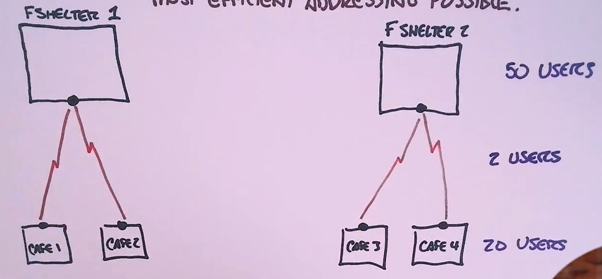
VLSM -> we use multiple subnet masks for the same situation
Multiple subnetting problem in one. we always start with the largest subnet first.
So biggest subnet needs:
50 users -> 6 bits
| 128 | 64 | 32 | 16 | 8 | 4 | 2 | 1 |
| I |
/24 -> 11111111. 11111111. 11111111.00000000
Saving hosts 11111111. 11111111. 11111111.11000000 -> /26
Increment is 64
192.168.1.0 – 192.168.1.63
192.168.1.64 – 192.168.1.127
192.168.1.128
First ranges: 192.168.1.0-63 /26 and 192.168.1.64-127
Next biggest network:
20 users 5 bits
| 128 | 64 | 32 | 16 | 8 | 4 | 2 | 1 |
| I |
/24 -> 11111111. 11111111. 11111111.00000000
Saving hosts: 11111111. 11111111. 11111111.11100000 -> /27
Increment is 32
Next ranges:
192.168.1.128 – 192.168.1.159 -> Café 1
192.168.1.160 – 192.168.1.191 -> Café 2
192.168.1.192 – 192.168.1.223 -> Café 3
Café 4 got detroyed 😉
Next subnet:
2 users -> 2 bits
| 128 | 64 | 32 | 16 | 8 | 4 | 2 | 1 |
| I |
/24 -> 11111111. 11111111. 11111111.00000000
Saving hosts: 11111111. 11111111. 11111111.11111100 -> /30
Increment is 4
Next ranges:
192.168.1.224 – 192.168.1.227 -> Router 1
192.168.1.228 – 192.168.1.231 -> Router 2
192.168.1.232 – 192.168.1.235 -> Router 3
192.168.1.236 – 192.168.1.239 -> Router 4
192.168.1.240 – 255 -> open
I marked the “saving the hosts 0s” with red and the end and start of the next network with purple.