How NAT Works
The networks under RFC1918 which are considered private do NOT work on the internet. Well, they could theoretically but if you get internet from an ISP then those ISP have a ACL which block that private IP address ranges. We are allowed to use those addresses inside our network and when we go out to the internet we translate them to public addresses. So NAT does translate private ip addresses to public ip addresses.
NAT Concepts
Static NAT
If we do static NAT we would map a public ip address to a private ip address.
So, for example, 192.168.1.50 comes through and wants to go to the internet then translate it to 216.0.5.20.
When the internet replies then it gets translated back to 192.168.1.50. So the two way communication works.
Usually used for people coming in to get to the private ip addresses.
Dynamic NAT
Dynamic NAT means we got a pool of private addresses which get translated to a pool of public addresses.
All of 192.168.1.0/24 gets a pool of public addresses of 216.0.5.0/24.
NAT overload
NAT overload allows multiple private ip addresses to share a few public addresses.
All of the ip addresses of 192.168.1.0/24 to translate to share these one ip address 216.0.5.2.
Technically that’s called PAT (port address translation).
So if we go out and want to go to a webserver, we have 2 ports. 1 source port on 45865 and one destination port 443 for the webserver. And that is the secret behind NAT overload.
So as the traffic goes through the router it adds the port number to the ip address (and save that to the NAT table) it allows you to share your private ip address among so many things.
Cisco Terms
Because this terms are a bit special, we jsut talk a short period of time about the cisco terminology in NAT.
Inside local -> private, local ip addresses (our internal client)
Outside global -> public, global ip addresses (server out in the internet)
Inside global -> we own it but it’s public (internet facing side of our router)
Outside local -> somebody else owns it, but it’s private (??)
- Only used for a fix translation like we define that the ip 192.168.1.92 gets translated to 24.1.5.9. It looks local but in reality it goes out to something which is owned by someone else
INSIDE / OUTSIDE: who owns it?
- Inside -> we own that
- Outside -> somebody else owns it
LOCAL / GLOBAL: private vs. public
- Local is private
- Global is public
Configuring Static NAT
| Command for inside NAT | Type | Source address | Destination address | |||
| Ip | Nat | Inside | source | Static | <PRIVATE_LOCAL_IP> | <PRIVATE_GLOBAL_IP> |
With this command we configure a static NAT which translate the private local ip of our network to a public ip which is owned by us.
Configuring Dynamic NAT
In order to configure a dynamic NAT we have to create the following in advance:
- Create ACL
an ACL is an access control list. In other words, it’s a list of ip addresses which are permitted or denied for a specific action.
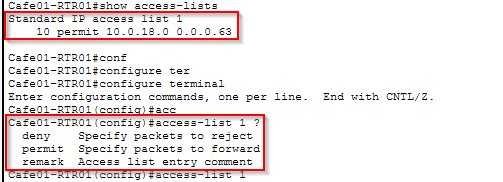
- Create pool

- Create dynamic NAT

Configuring NAT Overload
The command for NAT overload is very similar to dynamic NAT.
| Command for inside NAT | list | interface | mode | |||
| Ip | Nat | Inside | source | list 1 | interface gigabitEthernet0/1 | overload |
One public ip for a lot of endpoints thanks to overload