It is a plus to always use global templates for ports, so every switch you touch has your own style and navigation and troubleshooting gets easier because you are familiar with your environment.
There are two types of transition modes.Full duplex and half duplex, and there is auto negotiate for speed and duplex.
Full duplex means you can send AND recieve data simultanously. Where half duplex means one person sends, the other person recieves data and vice versa.
Wenn one site is full duplex and one site is half duplex there are collisions! These usually happens when one site is set to auto and the other site is hardcoded set to 100 Mbit/s, and then the auto detection fails. And when the auto detection fails it defaults to 100 Mbit/s half duplex.
So how do we fix it?
We go to our interface and set it manual to
- Speed 100
- Duplex full
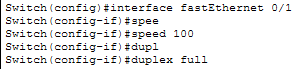
This causes a network outage, because the interface goes down and up!!
How do we know?
Normally you will find collisions in here for the interface:
Collisions were daily business in the old hub world. Now with switches, there should not be any collisions.