Table of Contents
Understanding Basic Interface Counters
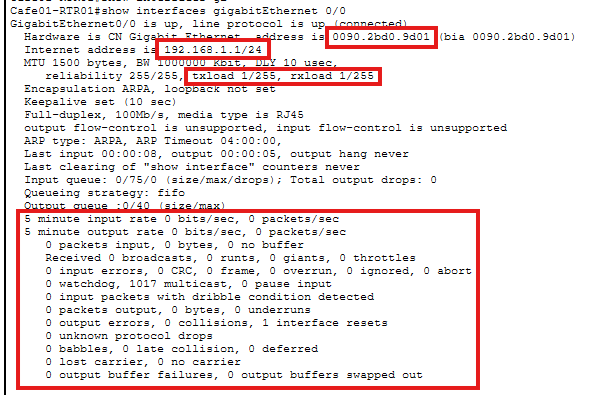
What we see in the picture above:
- Mac address of this specific interface
- Ip address set to this specific interface
- Send and receive load (txload for transmit and rxload for recieve)
- Input / output rate average 5 minutes
Under the total
Packets input
- CRC -> if crc goes up you got a physical problem
Packets output
- Output errors
almost every errors here is speed and / or duplex mismatch, because the router cannot watch the packet and see what happened to it except a duplex mismatch - Collisions
a collision is called a collision when it happens in the first 64 bytes - Late collisions
a late collision is called so when it happens after the first 64 bytes
Understanding Interface Speed
1 byte = 1 character -> e
1 bit = a 0 or a 1 (on or off)
8 bits = 1 byte -> 01010011
1 kilobyte = 1000 bytes -> 1 document full of characters
And so on..
Normal switchports are 1 Gbit/s and Uplink switchports are 10 Gbit/s or 100 Gbit/s
100 GB movie over a 100 Mbit/s network -> how long does it take to transmit?
100GB = 100’000 MB * 8 (to get bits) = 800’000 Mb
800’000 Mb / 100 Mbps = 8000 seconds = 133 minutes
MTU = maximal transmission unit
So the computer takes that 100GB movie and chops it into 1500 byte pieces, what is called a packet. It adds all those headers from the OSI model. So, we usually add about 20% overhead for that. As shown here in the interface statistics.
