Wireless is just another way to send 0’s and 1’s.
| Copper sends data with | Fiber sends data with | WiFi sends data with |
| Electricity | Light | Radio Frequencies |
CSMA /CD vs CSMA /CA
CSMA /CD -> Carrier sends multiple access /collision detection
CSMA /CA -> carrier sends multiple access /collision avoidance
AS devices join a wireless access point, it assigns them timeslots to send their data. So just by the nature of the technology, the more devices a wireless network has, the slower it gets.
What are “Frequencies”
Hz does not have to do anything with wireless. It just says how many times something repeats. The same like if you watch the ocean and see a wave crash -> that’s 1 Hz per seconds.
So if we add a diagram to that it shows as how many cycles we get in one second.
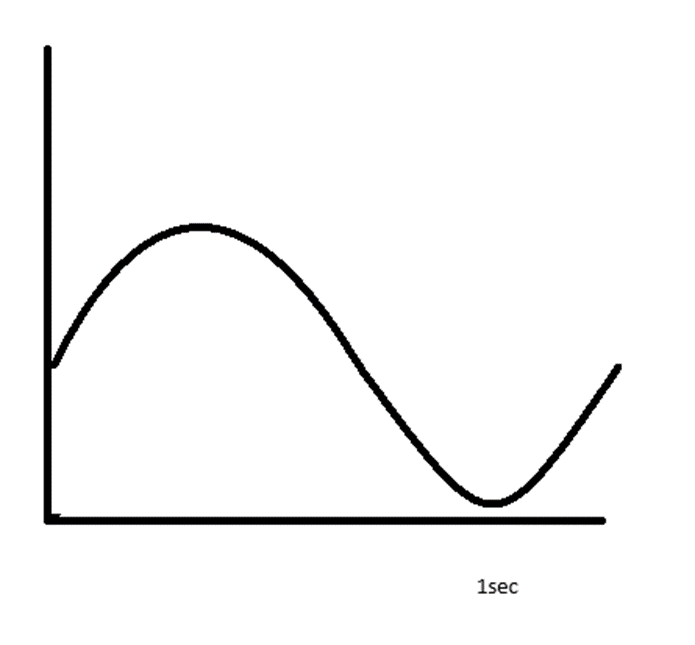
2.4 GHz -> 2.4 billion waves in one second
5 GHz -> 5 billion waves in one second
6 GHz -> 6 billion waves in one second
The higher the frequency the more data you can send, BUT the less far it goes! And that is a good thing.
On the old they days we just put in the access point and crack it open and let it send in full power and see how far it goes. The further away one device is, the bigger timeslot it needs, and the slower everybody has to go on the WAP.
Wireless challenges
Free space path loss FSPL
The further you go the harder it is to get a good signal. Most access points come with a omnidirectional antenna but you can tunnel it as well.
Absorption
EKAHAU -> wireless planning software
If the signal has to go through a wall some of the signal gets absorbed.
Reflection / refraction
FM / AM radio, if you were under a traffic light the signal is bad, 20 cm further it was good. Reflection happens when the signal zeros the first signal. If the signal goes through a window it gets bent.
Interference
2.4,5,6 GHz are all unlicensed frequencies. Anybody can bring them up. Microwaves, ovens all could interfere with the frequency of your WAP.
Planning Wireless Channels
Three frequencies, three channel sets
802.11 a/b/g/n
- 2.4 (2.4 -> 2.4835 GHz) 11 channels (only 3 were clean; 1,6,11)
- 5 (5.150 -> 5.895 GHz) 25 clean 20 MHz channels, 12 clean 40 MHz channels and so on
- 6 (5.925 -> 7.125 GHz) 59! channels
All the signals ware sent in the spectrum where the wireless access point. Inside of that you can turn in to your frequencies. A channel is one little segment of the spectrum where your access point sends ( a set of frequencies, there are 20,40,80,160).
Only channels 1,6 and 11 were good to go in the 2.4 GHz standard. So if someone picked channel 3 it could blow up channel 1 and 6 and the whole WiFi network connection was bad because the channel 3 overlaps with 1 and with 6.. This is known as co channel interference.
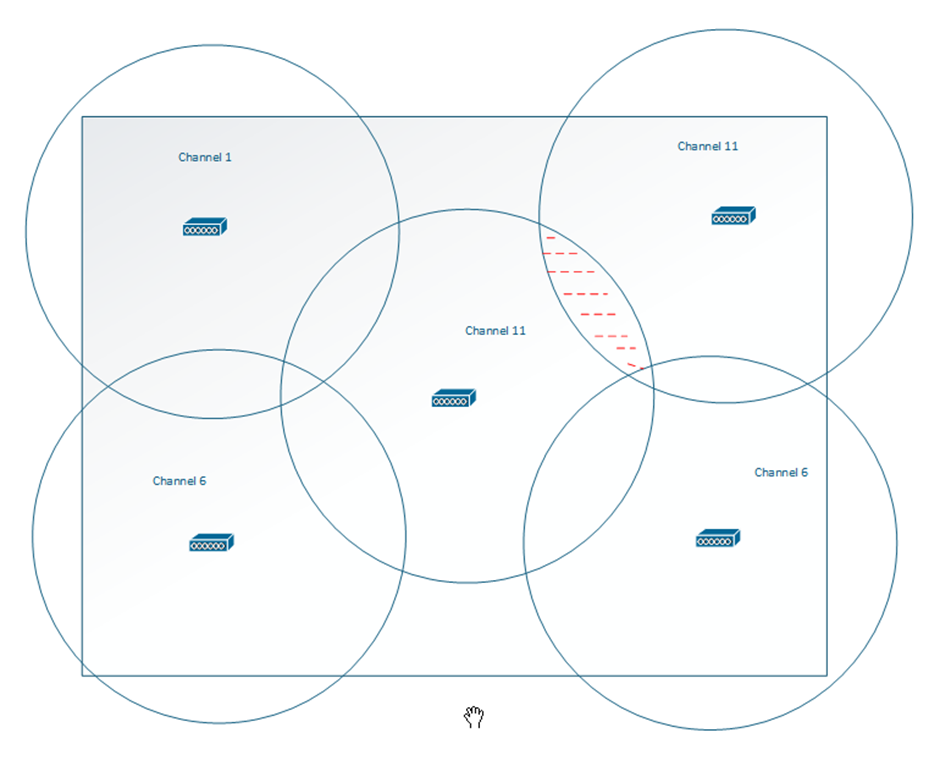
Always plan with 10 – 15% overlap.
SSID
An SSID (security set identifier) is just a friendly name of your wireless network of the announced network.
Each WAP that announces that network announces a BSS (basic service set). This service set provides a few information like there is a unique access point and there is one, so I can make a choice. One access point serving one SSID is giving out one BSS.
ESS (extended service set) is when you have multiple WAPs all announcing the same network.
MBSS (mash basic service set) allows to reach the wireless signals it gets and advertises it with new strength. You lose about half your efficiency doing that.
If you change channel during the day, all devices disconnect and connect to the new channel! So do this off office time!
Selecting and Associating with the Appropriate WAP
High level WAP types
- Autonomous
When each WAP is managed on its own. If you buy a WAP for your house its normally autonomous. - Lightweight (Cisco WLC)
Cisco wireless LAN controller and that controls all of your WAPs in your environment. - Cloud based
The brain for this WAP exists on the internet and controls the WAP controller.
Always remember this goes two ways. When you narrow your antenna to target a specific place, do you think the iPhone or Android or whatever has the narrowed antenna to go back?
CAPWAP is a provisioning and tunnelling protocol. The WAP creates its own tunnel to the controller downloads the config and tunnel all the traffic through to the controller.
Most of the WAPs are head less operable. That means even when the WLC dies the WAP is running and running, but as soon as the WAP reboots it can’t get the connection.
Client association
When you have a client it DISCOVERS your WiFi. The WAP sends out a beacon “hey i’m here if you want to connect”. But the clients also sends out an active probe like “hello worlds, i need to know what wireless networks are here and what SSID they are advertising.
Wireless has a lot more drops than ethernet but that’s expected and normal.
Understanding Wireless Security
Why wireless security matters
In the world of wireless but it is impossible that the wireless signals stays inside the walls.
Mechanisms (encryption + auth)
WEP
Means Wired equivalent privacy but it was very easy to break. That was the beginning of a crisis, because when they realised that WEP is weak, but they already shipped out the hardware everywhere.
WPA
So, they changed the algorithm the first “real” wireless security. And it was a stop gap. WPA encryption was defined to use the same hardware as it was released and improved the algorithm so a script kiddy can’t crack it.
WPA2
Here they required a hardware upgrade, because here we use encryption like AES. That ruled the world until KRACK cracked it. WPA2 used a 4-way handshake. Client sends a NONCE and the WAP sends a NONCE back. And they could do a man-in-the-middle attack on step three, and again in the world of wireless it is not that hard to inject packets. And get the wireless AP it had previously used and encrypt everything and so on.
WPA3
The only reason to release the WPA3 was to fix that vulnerability.
Authentication types
PSK -> pre shared key -> and that is then used to generate the encryption keys that are used for your communication.
802.1X / EAP
Extensible authentication protocol, people can create their own authentication method. A common one is LEAP or PEAP. You can do a AD authentication and if the password is correct (and the user is active) the access is granted. If the user is disabled your wireless access has also been cut off.