QoS Concept Overview
- Bandwidth
Bandwidth is a limited supply. If we have infinite bandwidth we would’nt have the need of QoS. If there is no concession (permit) there is no need of QoS.
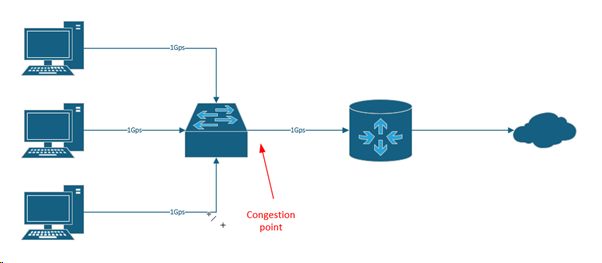
Because we don’t have enough bandwidth to send all through at the same time a mechanism called FIFO (first-in first-out) gets triggered.
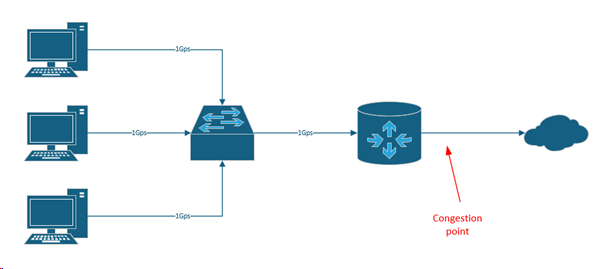
The more realistic congestion point though is from your router to the internet. You have a subscription only for a amount of donwload and upload speed, so when you exceed that it gets throttlened down, and that’s where you feel “the internet is so slow”.
- EVIL MONSTERS:
DELAY: When the bandwidth gets exceeded the router puts the data in memory and waits until the bandwidth does not get exceeded anymore and sends the data then.
JITTER: is when you get delay variation, for example when you have a phone call from USA to AUS and one packets has a time to arrive of 80ms, another packet has a time of 90ms, another packet has a time of 70ms and so on.
AT the end device there is a “dejitter buffer”, that’s something like a dereader buffer on the CD players. So if you bump the CD the music wouldn’t turn off immediately because it has that buffer.
DROP: if a packets gets dropped, you hear in the call like a stutter or freeze the video for a small amount of time, that’s because that packets got dropped and the next packet arrived. - SUPERHEROS:
CLASSIFY: is where you take traffic and identify it by different types
MARK: “I’m gonna color that packet” -> Red packets are valuable ones - SHAPING: before exceeding the bandwidth it stores the information in memory and try to smooth out that curve to get the maximum of our bandwidth, you can’t shape forever (you run out of memory) but it allows you to eliminate temporary congestion.
- POLICE: intentional dropping, so it drops every 1 of 10 packets for that specific guy and that means “don’t send that much data”
- QUEUE: good discrimination; if you have multiple packets in a queue and you defined a QoS for VoiP (red packets to think in colors), so it goes along this queue und lets all the red packets through first, because these are defined to be important ones.
Understanding Classification and Marking Process
Classifying
The Network device asks: “what are you?, oh you are streaming” then go stand over there.
You can do this with variety of services:
- ACL -> match this by portnumber, protocol, time ranges and so on
- NBAR (network based application recommondation) -> this allows the router to get a peak into the application layer of the OSI model, because tipically f.e. browser use the same signature.
- INTERFACE -> you can match what interface or subinterface the traffic came in
This is all done in a class-map. If you create a “class-map” and then type “match ?” you see what you can set to match. But the goal of classify is to do it only ONCE! Because that is processor intense.
Marking
After classifying you put a label at the outside (here with numeric values), so you don’t have to do the processor intense work again.
You can do the marking at the layer 2 headers (prioritize at the switch level) or the layer 3 headers (prioritize at the router level).
Layer 2 header has 3 bits. Class of service -> COS
This class of service bits are right beside the VLAN information in that packet.
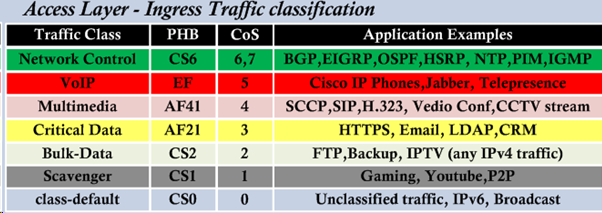
So three bits equals the maximum number of 7. So you can mark 8 vlaues.
Layer 3 has 3 bits. Table of service -> TOS
DSCP -> differentiated services code point -> 64 bits
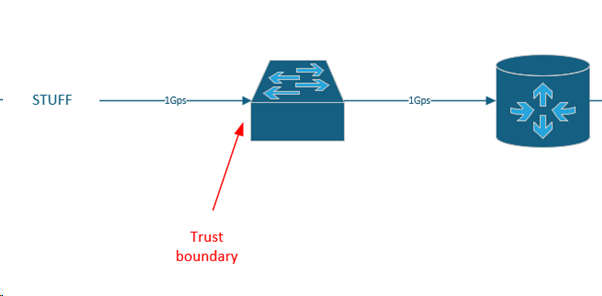
Trust boundary -> the first place that you mark, and from here on I am not gonna worry about classifying at least not based on what’s inside the packet
And from that trust boundary point the packet is trusted for the other devices in the network too.
Per hop behavior:
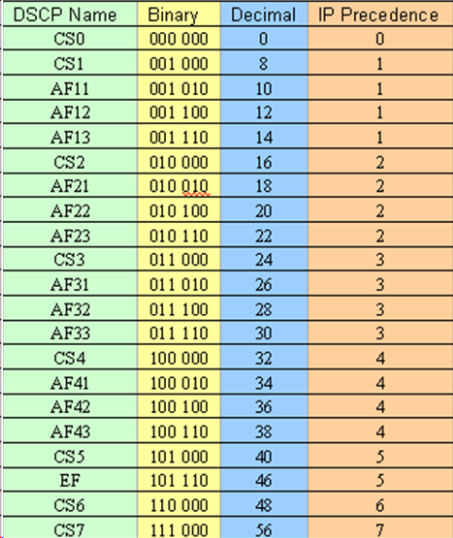
DSCP table
Explanation
CS -> class selector AF -> assured forwarding EF -> expedited forwarding (typically phone traffic -> it’s not gonna drop). There are 4 levels of assured forwarding(AF). After these 3 levels there comes another class selector. The higher the assured forwarding (represents the priority) the better, the lower the drop preference (second three bits) the better.
So AF23 beats AF11. And AF41 beats AF43. If you send this AF23 to an old router, which only supports IPP, it still can prioritize because its reads the first 3 bits.
QoS Treatment Methods (Queuing, Shaping, Policing)
Only is applied when we don’t have enough bandwidth.
So by default when we are out of bandwidth it starts taildropping:
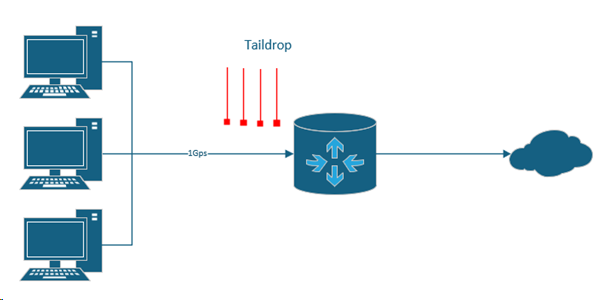
And we don’t want to have that, because when taildropping we don’t look anymore which packet has which priority or is marked with what, the router just says “I’m out of memory, drop that”. The second thing happens when we taildrop is “global synchronization”. That means when we reached the point of the maximum bandwidth everything gets dropped, traffic line falls, gets built up again, falls again and so on.
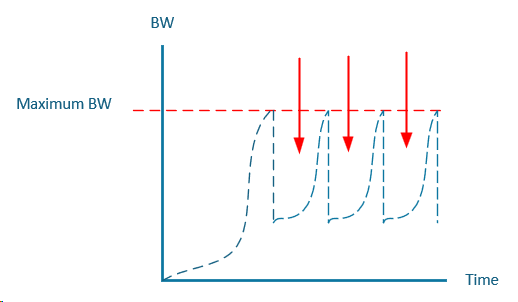
And all the free space you see marked is waste, that’s bandwidth lost.
Shaping
Shaping is the gentle cut it off, “it’s ok we try to let you through”.
Policing
Policing is where you just cut it off, “ok when we hit 500kbit/s, it’s done”.
WRED
WRED -> Waited random early detection is, as your queue is starting to build up it steps onto the scene and starts dropping some of the lower priority traffic (AF13, AF12, AF11). So you do intentionally dropping some of the lower priority traffic so the other traffic gets through and the bandwidth does not get exceeded.
Queuing
Queueing mechanism, what do you do when the traffic is queued. Default is FIFO (first-in first-out).
WFQ
WFQ -> Waited fair queuing, gives low bandwidth senders higher priority than high bandwidth senders. So it’s fair for everyone.
CUST Q
CUST Q -> Custom queuing, lets allow you to say I want to assign certain allocations of applications a certain amount of bandwidth. So if you have customized applications like App1 gets 50Mbit/s, App2 gets 100Mbit/s, App3 gets 50Mbit/s. Then it starts a roundrobin. So App1 gets 50 here, App2 gets 100 there, App3 gets 50 here and starts from the beginning. Is NOT good if you have VoIP in this queue.
PRIO Q
PRIO Q -> priority queuing, priority queuing says this queue gets ALWAYS the priority queue first. So in the custom queue the device stops and says “hold on, let’s get that priority queue first through” then it cycles back to the custom queue again and so on. The challenge is that if the prio queue has enough traffic so only this traffic gets through the other queues “starve”, that’s called traffic starvation.
Mother of all – LLQ
Cisco came up with this and it basically combines all the queues above.
So what it does, we gonna have a priority queue, you have to choose whats going in there, but we make sure it does not kill the network, so this priority queue gets policed.
We gonna have custom queues for all the different traffic you like, and everything else you didn’t put in a queue gets the WFQ (waited fair queue), so all three are combined together.
Cisco IOS commands learned in this lesson
| Command | Subcommand | Explanation |
| Show policy-map <WORD> | Shows the policy-map | |
| Show policy-map interface EthernetX/Y input | Shows the input statistics of this interface, with the policy-maps visible | |
| Ip access-list extendend <WORD> | Creates an extended ACL | |
| Permit tcp/udp <S-NETWORK> <WILDCARDBITS> <D-NETWORK> <WILDCARDBITS> eq <PORT> | Allows this tcp/udp traffic from S to D with that port | |
| Class-map | Match-any <WORD> | Creates a class-map with the OR operator (only 1 statement has to be matched) |
| Match-all <WORD> | Creates a class-map with the AND operator (all statements have to be matched) | |
| Match access-group name <WORD> | Matches the class-map with a ACL | |
| Match protocol rtsp | Matches the class-map with a defined protocol (here rtsp) | |
| Show class-map <WORD> | Shows the specific class-map | |
| Show class-map | Shows all class-maps | |
| Policy-map <WORD> | Creates a policy-map | |
| Class <class-map-name> | Refers to the class-map created in advance | |
| Set ip | Dscp ef | Sets the DSCP value to EF expedited forwarding (voice) |
| Dscp AF41 | Sets the DSCP value to AF41 expedited forwarding (streaming) | |
| Dscp cs1 | Sets the DSCP value to CS1 (scavenger treatment) |